

Watermark your images, batch after batch.

Add a logo or text watermark with full control over position, size and opacity, then apply it consistently across an entire batch.

Free to start · Batch-ready · Private by design · Your images are never used for training

Background removed Original photo Original Background removed
6
tools in one
<5s
per cutout
25MP
max resolution
~$0.01
per HD image

PixelMod Studio

Drop in. Ship out.

Choose a tool, add one image or a full batch, and export. Everything happens in the same workspace.

PixelMod Studio

Your creativity deserves more room.

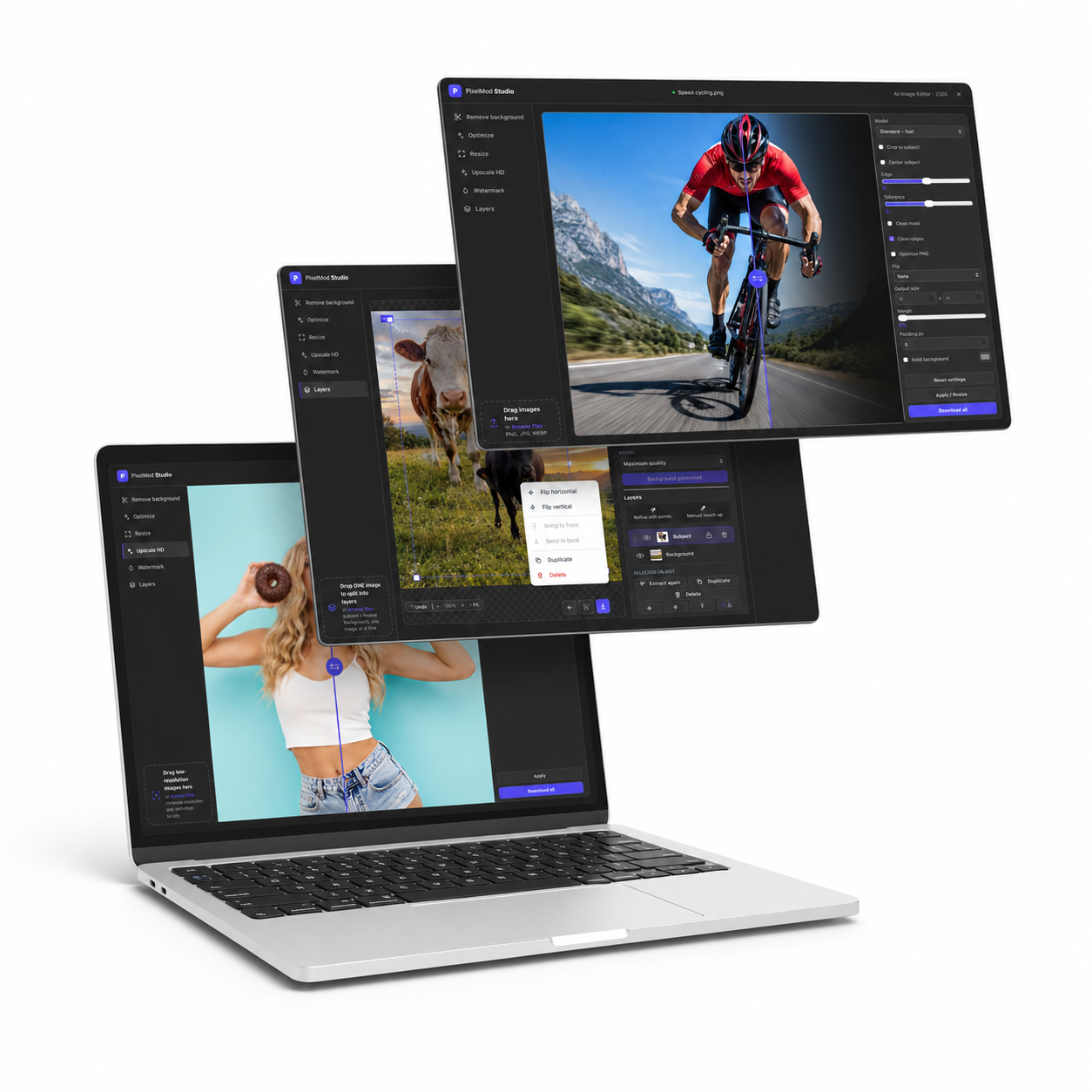
Studio brings all your tools together. Open PixelMod on an iPad or computer to edit comfortably, organize your Layers, and see every detail.

Available for iPad and desktop · your images stay with you

PixelMod Studio
Untitled image
AI Image Editor · 2305

Drop an image to remove its background

or · PNG, JPG, WEBP · one image at a time

Heads up: very low-res, pixelated, or busy-background photos may not cut perfectly and can need a quick manual touch-up.

Mask & edge controls
Output & canvas controls

Results may vary. Review your image before use—complex scenes or compression artifacts may require manual refinement with the editing tools.

Batch image watermark tool

Make every image unmistakably yours.

Add your logo or text watermark to a whole batch in one clean workflow. Keep product catalogs, portfolios and social content consistent without editing every file manually.

Set the position, scale and opacity once, preview the result and export images that look branded—not covered up.

Brand at scale

Apply one polished watermark setup to an entire folder.

Stay in control

Place your mark exactly where it supports the image.

Private workflow

Use PixelMod Desktop for unlimited local edits without AI tokens.

Six tools. One flow.

Finish the image, not just the cutout.

Start with any image. Leave with the exact size, quality and finish you need.

Built for batches. Apply one setup to an entire folder and export as ZIP.

Layers is in beta. More layers and sharper separation are in progress.

Pricing

Simple, affordable plans

Start free, upgrade when you need higher resolution or Maximum Quality. Downloads are unlimited in the desktop app on every plan — only resolution and model scale with your tier.

Free

For trying it out.

$0 /month


Start free
  • 5 downloads / month on web (≤ 0.5 MP)
  • Unlimited downloads in the desktop app (≤ 0.5 MP, Standard model)
  • Higher resolution and Maximum Quality are paid upgrades
  • All tools + manual touch-up

Starter

For light regular use.

$7 USD / month

≈ $0.014 USD per HD image

  • 100 downloads / month on web
  • Unlimited downloads in the desktop app
  • Up to 16 MP · Maximum Quality unlocked
  • All tools + touch-up
Most popular

Pro

For creators and shops.

$14 USD / month

≈ $0.007 USD per HD image · best value

  • 1,000 downloads / month on web
  • Unlimited downloads in the desktop app
  • Up to 25 MP · Maximum Quality unlocked
  • Priority processing

Prices are in USD; applicable taxes are shown at checkout. Every paid plan is one subscription for web and Desktop. Resolution ceiling and unlocked models are identical on both — only the download count differs: metered on web, unlimited in the desktop app.

Downloads

The whole studio, right on your desktop

The same AI as the web app — running fully offline on your Mac or PC. Sign in with Google to unlock your plan; downloads are unlimited in the desktop app on every plan, with the same resolution ceiling and Maximum Quality from Starter.

Your images never leave your machine

The desktop app runs the AI locally — client work, NDAs and private photos never touch the internet.

  • One login, everywhere — one Google sign-in unlocks web and desktop.
  • Unlimited downloads — no monthly count on desktop, at your plan's full resolution ceiling and Maximum Quality from Starter.
  • Fully offline — sign in once, then work with no connection.

Free · Starter · Pro plans · macOS 12+ (Apple Silicon & Intel) · Windows 10/11 64-bit · ~85 MB · your Google plan works on the web too

PixelMod desktop app
FAQ

Questions, answered

Do you store my images?+

No. Web uploads are encrypted and deleted automatically after processing; we never use them for training. For sensitive work, the desktop app processes everything on your machine.

Which file formats are supported?+

You can drop PNG, JPG/JPEG and WEBP. Background removal and resizing export transparent PNGs; Optimize and Resize can also export tuned JPEGs.

Can I process many images at once?+

Absolutely. Drop a whole batch, adjust the options once, hit Apply and download everything as a single ZIP built locally in your browser.

Is the number of images unlimited?+

In the desktop app, yes — downloads are unlimited on every plan, including Free. On web, each plan has a monthly download allowance (5 on Free, 100 on Starter, 1,000 on Pro). Resolution and model are the same on both surfaces: Free is capped at 0.5 MP with the Standard model. Starter and Pro both unlock Maximum Quality — what varies between them is the download resolution: up to 16 MP on Starter, up to 25 MP on Pro.

What if the cutout isn't perfect?+

Use the manual touch-up brush on any result to restore or erase areas, or flood-fill by color. You can also try a different model, enable edge refinement, or nudge the tolerance slider.

How much does it cost?+

There's a free tier to get started, with unlimited downloads in the desktop app. Paid plans unlock higher resolution, Maximum Quality, and more monthly downloads on web — see pricing.